NotifySound
Sounds for the notifications that keep quiet.
 100% Free & Open Source
MIT License
Linux / GNOME
Python + GTK4
100% Free & Open Source
MIT License
Linux / GNOME
Python + GTK4
Sounds for the notifications that keep quiet.
100% Free & Open Source
MIT License
Linux / GNOME
Python + GTK4
On GNOME, a notification only makes a sound when the app that sent it explicitly includes a sound-name or sound-file hint. Most apps never do — Warp, terminals, IDE builds, cron-like tools — so their notifications stay completely silent.
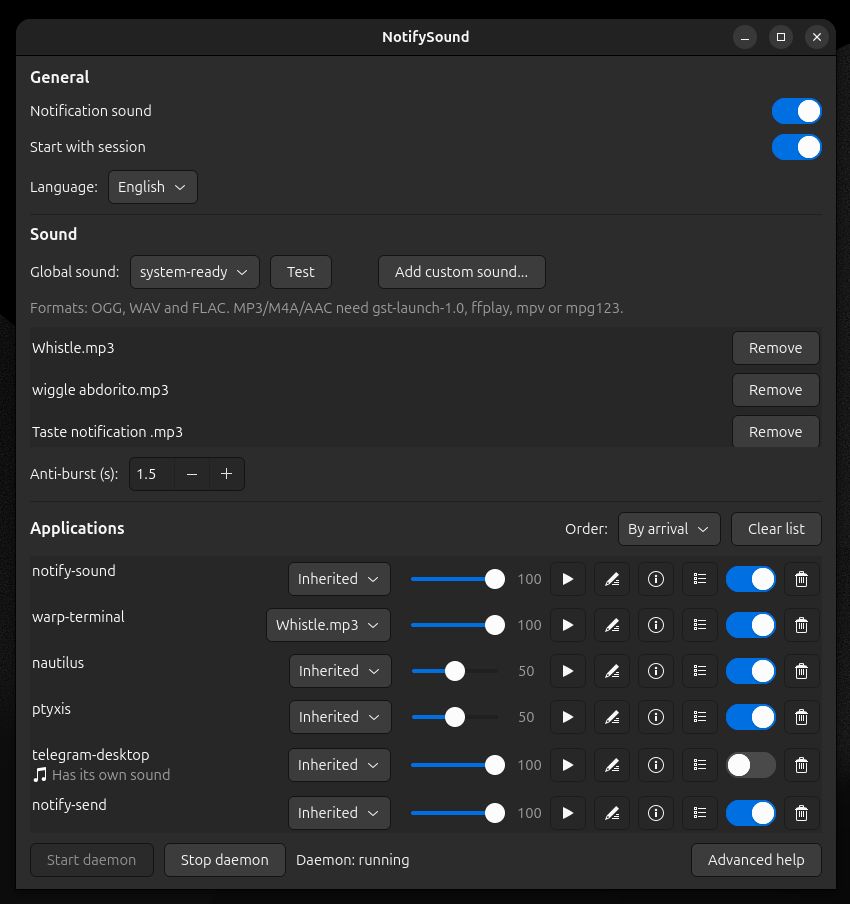
Apps that do play their own sound (Telegram, WhatsApp PWAs, etc.) are left untouched by default: they are marked with a "Tiene sonido propio" label and their per-app switch is off. Enable the per-app switch if you intentionally want both sounds.
Enable sound to hear the notification. First without NotifySound (silent), then with NotifySound (sound plays).
GNOME notifications don't play a sound by default. The freedesktop notification spec includes optional hints (sound-name, sound-file), but most apps never set them — so terminals, IDE builds, cron-like tools and many others stay completely silent.
This isn't a bug: GNOME's maintainers have explained that apps rely on notifications being silent (some play their own sound and would double up), and the new notification API will default to having sounds. Until then, NotifySound fills the gap.
The daemon watches GNOME, GTK and freedesktop notification paths and plays your chosen sound when an app sends a notification without one.
Notifications with their own sound (or that declare suppress-sound) are respected.
Enable/disable each app and give it its own sound. Apps are detected automatically and grouped by process (so AIMP shows as one entry, not one per song).
Set a different volume (0-100 %) for each application, so loud apps can be tamed and quiet ones amplified.
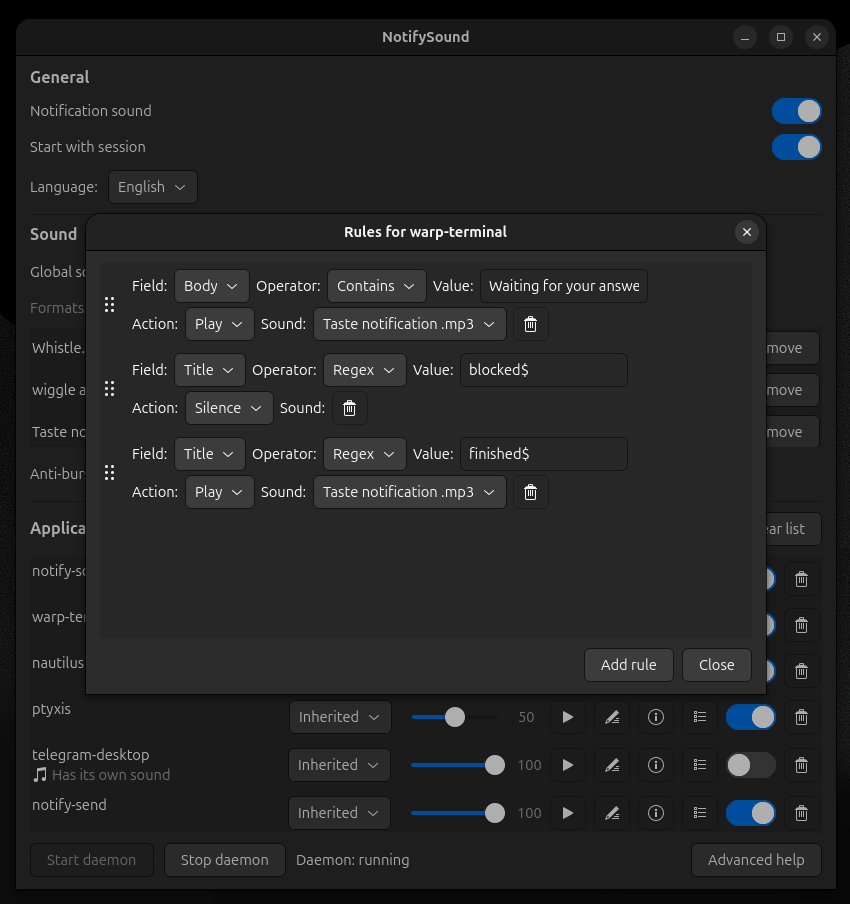
Play or silence specific notifications by body, title or urgency level (low, normal, critical).
Repeated notifications from the same app within a configurable time window only play once.
Rename detected apps to a friendly name ("AIMP" instead of a process id). Merge duplicates by renaming them to the same alias; undo from the info popover.
Add your own OGG/WAV/FLAC (and MP3/M4A/AAC with GStreamer, ffplay, mpv or mpg123).
notify-sound done sends a completion notification when a long command finishes — and plays its sound even if the daemon is not running.
Choose sounds, test them, manage apps and daemon state from one window.
The settings app is available in English and Spanish, with an in-app language selector.
The source installer needs no sudo; Ubuntu/Debian users can also use the release package.
There's a GNOME Shell extension that also adds sound to notifications. Here's an honest comparison:
| NotifySound | GNOME extension | |
|---|---|---|
| Type | Standalone daemon + GTK4 GUI | GNOME Shell extension |
| Scope | GNOME, GTK and freedesktop paths | GNOME Shell notifications |
| Per-app control | Enable/disable per app, per-app sounds, per-app volume, content rules, aliasing | Sound for all notifications |
| Custom sounds | OGG/WAV/FLAC/MP3/M4A/AAC | System sound theme |
| Settings | GTK4 window | GNOME Extensions preferences |
| Install | .deb or per-user script | One click on extensions.gnome.org |
| Outside GNOME | GNOME-focused, freedesktop paths | No (GNOME Shell only) |
Both are free and open source. Pick whichever fits your workflow — or run both if you like.
Ubuntu / Debian package (recommended):
sudo dpkg -i ./notify-sound_0.1.10_all.deb
sudo apt-get -f install
Or install per-user from source (no sudo):
Ubuntu / Debian dependencies:
sudo apt install python3-gi gir1.2-gtk-4.0 gnome-session-canberra dbusThen clone and install (no sudo needed):
git clone https://github.com/ChristianM023/notify-sound.git
cd notify-sound
./install.sh
Usage:
notify-sound               # open the settings GUI
notify-sound --daemon      # start the daemon
notify-sound --quit        # stop the daemon
notify-sound done [message] # notify when a long command finishes
Tip: append notify-sound done after a long command to get a notification when it finishes — it plays even if the daemon is not running:
./long-build.sh; notify-sound doneOther distributions: see the README for requirements and alternatives.
After installing, verify it works in seconds:
notify-sound --daemon
notify-send "Test" "If you hear a sound, it works"
If you installed with autostart enabled (the default), the daemon is already running and the notify-send line alone is enough.
You can also test the command-completion notification — it plays even if the daemon is not running:
notify-sound done "Done"canberra-gtk-play is installed and the daemon is running.ffplay, mpv, mpg123.suppress-sound (intentional) — check the per-app toggle.See the README for the full troubleshooting guide.
NotifySound runs entirely on your machine — it never connects to the network, sends no telemetry, and stores no notification content. It reads only notification metadata (app name, hints) in memory; the only thing written to disk is per-app state (notification count, last-seen time) in ~/.config/notify-sound/state.json, never the body of a notification. Config and state files are written atomically with O_NOFOLLOW and mode 0600, so only your user can read them.
See the README for the full privacy and security details.
NotifySound is free and open source, for everyone. If it makes your day a little better and you want to say thanks, any contribution is welcome — but nothing is mandatory.




Please double-check the network before sending: USDT on TRC-20 (Tron), BNB on BSC (BEP-20). The project is non-commercial; donations are used only to keep development going.